
Instructions to use Mungert/Qwen3-4B-Instruct-2507-GGUF with libraries, inference providers, notebooks, and local apps. Follow these links to get started.
- Libraries
- Transformers
How to use Mungert/Qwen3-4B-Instruct-2507-GGUF with Transformers:
# Use a pipeline as a high-level helper from transformers import pipeline pipe = pipeline("text-generation", model="Mungert/Qwen3-4B-Instruct-2507-GGUF") messages = [ {"role": "user", "content": "Who are you?"}, ] pipe(messages)# Load model directly from transformers import AutoModel model = AutoModel.from_pretrained("Mungert/Qwen3-4B-Instruct-2507-GGUF", dtype="auto") - llama-cpp-python
How to use Mungert/Qwen3-4B-Instruct-2507-GGUF with llama-cpp-python:
# !pip install llama-cpp-python from llama_cpp import Llama llm = Llama.from_pretrained( repo_id="Mungert/Qwen3-4B-Instruct-2507-GGUF", filename="Qwen3-4B-Instruct-2507-bf16.gguf", )
llm.create_chat_completion( messages = [ { "role": "user", "content": "What is the capital of France?" } ] ) - Notebooks
- Google Colab
- Kaggle
- Local Apps
- llama.cpp
How to use Mungert/Qwen3-4B-Instruct-2507-GGUF with llama.cpp:
Install from brew
brew install llama.cpp # Start a local OpenAI-compatible server with a web UI: llama-server -hf Mungert/Qwen3-4B-Instruct-2507-GGUF:Q4_K_M # Run inference directly in the terminal: llama-cli -hf Mungert/Qwen3-4B-Instruct-2507-GGUF:Q4_K_M
Install from WinGet (Windows)
winget install llama.cpp # Start a local OpenAI-compatible server with a web UI: llama-server -hf Mungert/Qwen3-4B-Instruct-2507-GGUF:Q4_K_M # Run inference directly in the terminal: llama-cli -hf Mungert/Qwen3-4B-Instruct-2507-GGUF:Q4_K_M
Use pre-built binary
# Download pre-built binary from: # https://github.com/ggerganov/llama.cpp/releases # Start a local OpenAI-compatible server with a web UI: ./llama-server -hf Mungert/Qwen3-4B-Instruct-2507-GGUF:Q4_K_M # Run inference directly in the terminal: ./llama-cli -hf Mungert/Qwen3-4B-Instruct-2507-GGUF:Q4_K_M
Build from source code
git clone https://github.com/ggerganov/llama.cpp.git cd llama.cpp cmake -B build cmake --build build -j --target llama-server llama-cli # Start a local OpenAI-compatible server with a web UI: ./build/bin/llama-server -hf Mungert/Qwen3-4B-Instruct-2507-GGUF:Q4_K_M # Run inference directly in the terminal: ./build/bin/llama-cli -hf Mungert/Qwen3-4B-Instruct-2507-GGUF:Q4_K_M
Use Docker
docker model run hf.co/Mungert/Qwen3-4B-Instruct-2507-GGUF:Q4_K_M
- LM Studio
- Jan
- vLLM
How to use Mungert/Qwen3-4B-Instruct-2507-GGUF with vLLM:
Install from pip and serve model
# Install vLLM from pip: pip install vllm # Start the vLLM server: vllm serve "Mungert/Qwen3-4B-Instruct-2507-GGUF" # Call the server using curl (OpenAI-compatible API): curl -X POST "http://localhost:8000/v1/chat/completions" \ -H "Content-Type: application/json" \ --data '{ "model": "Mungert/Qwen3-4B-Instruct-2507-GGUF", "messages": [ { "role": "user", "content": "What is the capital of France?" } ] }'Use Docker
docker model run hf.co/Mungert/Qwen3-4B-Instruct-2507-GGUF:Q4_K_M
- SGLang
How to use Mungert/Qwen3-4B-Instruct-2507-GGUF with SGLang:
Install from pip and serve model
# Install SGLang from pip: pip install sglang # Start the SGLang server: python3 -m sglang.launch_server \ --model-path "Mungert/Qwen3-4B-Instruct-2507-GGUF" \ --host 0.0.0.0 \ --port 30000 # Call the server using curl (OpenAI-compatible API): curl -X POST "http://localhost:30000/v1/chat/completions" \ -H "Content-Type: application/json" \ --data '{ "model": "Mungert/Qwen3-4B-Instruct-2507-GGUF", "messages": [ { "role": "user", "content": "What is the capital of France?" } ] }'Use Docker images
docker run --gpus all \ --shm-size 32g \ -p 30000:30000 \ -v ~/.cache/huggingface:/root/.cache/huggingface \ --env "HF_TOKEN=<secret>" \ --ipc=host \ lmsysorg/sglang:latest \ python3 -m sglang.launch_server \ --model-path "Mungert/Qwen3-4B-Instruct-2507-GGUF" \ --host 0.0.0.0 \ --port 30000 # Call the server using curl (OpenAI-compatible API): curl -X POST "http://localhost:30000/v1/chat/completions" \ -H "Content-Type: application/json" \ --data '{ "model": "Mungert/Qwen3-4B-Instruct-2507-GGUF", "messages": [ { "role": "user", "content": "What is the capital of France?" } ] }' - Ollama
How to use Mungert/Qwen3-4B-Instruct-2507-GGUF with Ollama:
ollama run hf.co/Mungert/Qwen3-4B-Instruct-2507-GGUF:Q4_K_M
- Unsloth Studio new
How to use Mungert/Qwen3-4B-Instruct-2507-GGUF with Unsloth Studio:
Install Unsloth Studio (macOS, Linux, WSL)
curl -fsSL https://unsloth.ai/install.sh | sh # Run unsloth studio unsloth studio -H 0.0.0.0 -p 8888 # Then open http://localhost:8888 in your browser # Search for Mungert/Qwen3-4B-Instruct-2507-GGUF to start chatting
Install Unsloth Studio (Windows)
irm https://unsloth.ai/install.ps1 | iex # Run unsloth studio unsloth studio -H 0.0.0.0 -p 8888 # Then open http://localhost:8888 in your browser # Search for Mungert/Qwen3-4B-Instruct-2507-GGUF to start chatting
Using HuggingFace Spaces for Unsloth
# No setup required # Open https://huggingface.co/spaces/unsloth/studio in your browser # Search for Mungert/Qwen3-4B-Instruct-2507-GGUF to start chatting
- Pi new
How to use Mungert/Qwen3-4B-Instruct-2507-GGUF with Pi:
Start the llama.cpp server
# Install llama.cpp: brew install llama.cpp # Start a local OpenAI-compatible server: llama-server -hf Mungert/Qwen3-4B-Instruct-2507-GGUF:Q4_K_M
Configure the model in Pi
# Install Pi: npm install -g @mariozechner/pi-coding-agent # Add to ~/.pi/agent/models.json: { "providers": { "llama-cpp": { "baseUrl": "http://localhost:8080/v1", "api": "openai-completions", "apiKey": "none", "models": [ { "id": "Mungert/Qwen3-4B-Instruct-2507-GGUF:Q4_K_M" } ] } } }Run Pi
# Start Pi in your project directory: pi
- Hermes Agent new
How to use Mungert/Qwen3-4B-Instruct-2507-GGUF with Hermes Agent:
Start the llama.cpp server
# Install llama.cpp: brew install llama.cpp # Start a local OpenAI-compatible server: llama-server -hf Mungert/Qwen3-4B-Instruct-2507-GGUF:Q4_K_M
Configure Hermes
# Install Hermes: curl -fsSL https://hermes-agent.nousresearch.com/install.sh | bash hermes setup # Point Hermes at the local server: hermes config set model.provider custom hermes config set model.base_url http://127.0.0.1:8080/v1 hermes config set model.default Mungert/Qwen3-4B-Instruct-2507-GGUF:Q4_K_M
Run Hermes
hermes
- Docker Model Runner
How to use Mungert/Qwen3-4B-Instruct-2507-GGUF with Docker Model Runner:
docker model run hf.co/Mungert/Qwen3-4B-Instruct-2507-GGUF:Q4_K_M
- Lemonade
How to use Mungert/Qwen3-4B-Instruct-2507-GGUF with Lemonade:
Pull the model
# Download Lemonade from https://lemonade-server.ai/ lemonade pull Mungert/Qwen3-4B-Instruct-2507-GGUF:Q4_K_M
Run and chat with the model
lemonade run user.Qwen3-4B-Instruct-2507-GGUF-Q4_K_M
List all available models
lemonade list
Qwen3-4B-Instruct-2507 GGUF Models
Model Generation Details
This model was generated using llama.cpp at commit cd6983d5.
Quantization Beyond the IMatrix
I've been experimenting with a new quantization approach that selectively elevates the precision of key layers beyond what the default IMatrix configuration provides.
In my testing, standard IMatrix quantization underperforms at lower bit depths, especially with Mixture of Experts (MoE) models. To address this, I'm using the --tensor-type option in llama.cpp to manually "bump" important layers to higher precision. You can see the implementation here:
👉 Layer bumping with llama.cpp
While this does increase model file size, it significantly improves precision for a given quantization level.
I'd love your feedback—have you tried this? How does it perform for you?
Click here to get info on choosing the right GGUF model format
Qwen3-4B-Instruct-2507
Highlights
We introduce the updated version of the Qwen3-4B non-thinking mode, named Qwen3-4B-Instruct-2507, featuring the following key enhancements:
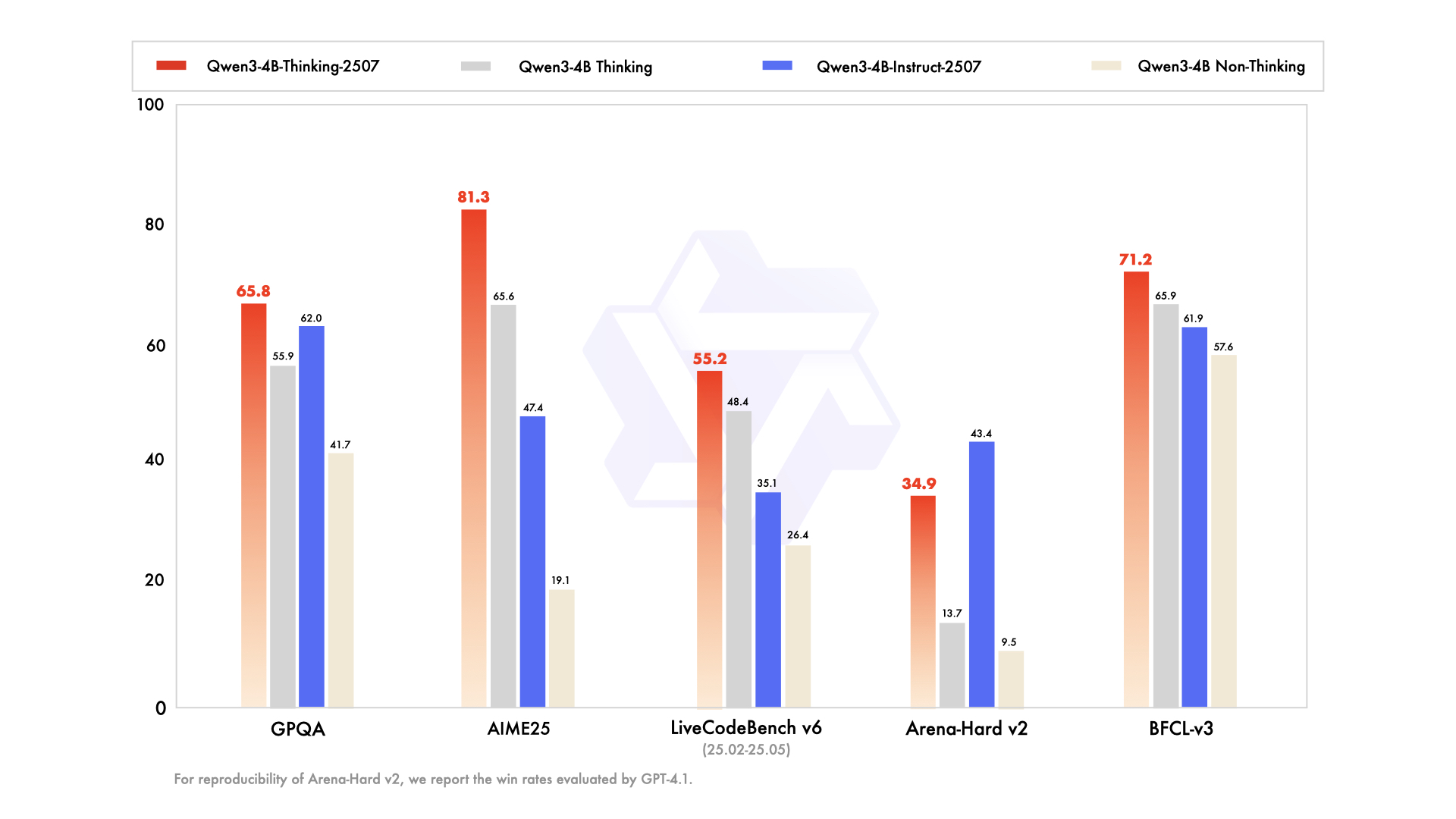
- Significant improvements in general capabilities, including instruction following, logical reasoning, text comprehension, mathematics, science, coding and tool usage.
- Substantial gains in long-tail knowledge coverage across multiple languages.
- Markedly better alignment with user preferences in subjective and open-ended tasks, enabling more helpful responses and higher-quality text generation.
- Enhanced capabilities in 256K long-context understanding.
Model Overview
Qwen3-4B-Instruct-2507 has the following features:
- Type: Causal Language Models
- Training Stage: Pretraining & Post-training
- Number of Parameters: 4.0B
- Number of Paramaters (Non-Embedding): 3.6B
- Number of Layers: 36
- Number of Attention Heads (GQA): 32 for Q and 8 for KV
- Context Length: 262,144 natively.
NOTE: This model supports only non-thinking mode and does not generate <think></think> blocks in its output. Meanwhile, specifying enable_thinking=False is no longer required.
For more details, including benchmark evaluation, hardware requirements, and inference performance, please refer to our blog, GitHub, and Documentation.
Performance
| GPT-4.1-nano-2025-04-14 | Qwen3-30B-A3B Non-Thinking | Qwen3-4B Non-Thinking | Qwen3-4B-Instruct-2507 | |
|---|---|---|---|---|
| Knowledge | ||||
| MMLU-Pro | 62.8 | 69.1 | 58.0 | 69.6 |
| MMLU-Redux | 80.2 | 84.1 | 77.3 | 84.2 |
| GPQA | 50.3 | 54.8 | 41.7 | 62.0 |
| SuperGPQA | 32.2 | 42.2 | 32.0 | 42.8 |
| Reasoning | ||||
| AIME25 | 22.7 | 21.6 | 19.1 | 47.4 |
| HMMT25 | 9.7 | 12.0 | 12.1 | 31.0 |
| ZebraLogic | 14.8 | 33.2 | 35.2 | 80.2 |
| LiveBench 20241125 | 41.5 | 59.4 | 48.4 | 63.0 |
| Coding | ||||
| LiveCodeBench v6 (25.02-25.05) | 31.5 | 29.0 | 26.4 | 35.1 |
| MultiPL-E | 76.3 | 74.6 | 66.6 | 76.8 |
| Aider-Polyglot | 9.8 | 24.4 | 13.8 | 12.9 |
| Alignment | ||||
| IFEval | 74.5 | 83.7 | 81.2 | 83.4 |
| Arena-Hard v2* | 15.9 | 24.8 | 9.5 | 43.4 |
| Creative Writing v3 | 72.7 | 68.1 | 53.6 | 83.5 |
| WritingBench | 66.9 | 72.2 | 68.5 | 83.4 |
| Agent | ||||
| BFCL-v3 | 53.0 | 58.6 | 57.6 | 61.9 |
| TAU1-Retail | 23.5 | 38.3 | 24.3 | 48.7 |
| TAU1-Airline | 14.0 | 18.0 | 16.0 | 32.0 |
| TAU2-Retail | - | 31.6 | 28.1 | 40.4 |
| TAU2-Airline | - | 18.0 | 12.0 | 24.0 |
| TAU2-Telecom | - | 18.4 | 17.5 | 13.2 |
| Multilingualism | ||||
| MultiIF | 60.7 | 70.8 | 61.3 | 69.0 |
| MMLU-ProX | 56.2 | 65.1 | 49.6 | 61.6 |
| INCLUDE | 58.6 | 67.8 | 53.8 | 60.1 |
| PolyMATH | 15.6 | 23.3 | 16.6 | 31.1 |
*: For reproducibility, we report the win rates evaluated by GPT-4.1.
Quickstart
The code of Qwen3 has been in the latest Hugging Face transformers and we advise you to use the latest version of transformers.
With transformers<4.51.0, you will encounter the following error:
KeyError: 'qwen3'
The following contains a code snippet illustrating how to use the model generate content based on given inputs.
from transformers import AutoModelForCausalLM, AutoTokenizer
model_name = "Qwen/Qwen3-4B-Instruct-2507"
# load the tokenizer and the model
tokenizer = AutoTokenizer.from_pretrained(model_name)
model = AutoModelForCausalLM.from_pretrained(
model_name,
torch_dtype="auto",
device_map="auto"
)
# prepare the model input
prompt = "Give me a short introduction to large language model."
messages = [
{"role": "user", "content": prompt}
]
text = tokenizer.apply_chat_template(
messages,
tokenize=False,
add_generation_prompt=True,
)
model_inputs = tokenizer([text], return_tensors="pt").to(model.device)
# conduct text completion
generated_ids = model.generate(
**model_inputs,
max_new_tokens=16384
)
output_ids = generated_ids[0][len(model_inputs.input_ids[0]):].tolist()
content = tokenizer.decode(output_ids, skip_special_tokens=True)
print("content:", content)
For deployment, you can use sglang>=0.4.6.post1 or vllm>=0.8.5 or to create an OpenAI-compatible API endpoint:
- SGLang:
python -m sglang.launch_server --model-path Qwen/Qwen3-4B-Instruct-2507 --context-length 262144 - vLLM:
vllm serve Qwen/Qwen3-4B-Instruct-2507 --max-model-len 262144
Note: If you encounter out-of-memory (OOM) issues, consider reducing the context length to a shorter value, such as 32,768.
For local use, applications such as Ollama, LMStudio, MLX-LM, llama.cpp, and KTransformers have also supported Qwen3.
Agentic Use
Qwen3 excels in tool calling capabilities. We recommend using Qwen-Agent to make the best use of agentic ability of Qwen3. Qwen-Agent encapsulates tool-calling templates and tool-calling parsers internally, greatly reducing coding complexity.
To define the available tools, you can use the MCP configuration file, use the integrated tool of Qwen-Agent, or integrate other tools by yourself.
from qwen_agent.agents import Assistant
# Define LLM
llm_cfg = {
'model': 'Qwen3-4B-Instruct-2507',
# Use a custom endpoint compatible with OpenAI API:
'model_server': 'http://localhost:8000/v1', # api_base
'api_key': 'EMPTY',
}
# Define Tools
tools = [
{'mcpServers': { # You can specify the MCP configuration file
'time': {
'command': 'uvx',
'args': ['mcp-server-time', '--local-timezone=Asia/Shanghai']
},
"fetch": {
"command": "uvx",
"args": ["mcp-server-fetch"]
}
}
},
'code_interpreter', # Built-in tools
]
# Define Agent
bot = Assistant(llm=llm_cfg, function_list=tools)
# Streaming generation
messages = [{'role': 'user', 'content': 'https://qwenlm.github.io/blog/ Introduce the latest developments of Qwen'}]
for responses in bot.run(messages=messages):
pass
print(responses)
Best Practices
To achieve optimal performance, we recommend the following settings:
Sampling Parameters:
- We suggest using
Temperature=0.7,TopP=0.8,TopK=20, andMinP=0. - For supported frameworks, you can adjust the
presence_penaltyparameter between 0 and 2 to reduce endless repetitions. However, using a higher value may occasionally result in language mixing and a slight decrease in model performance.
- We suggest using
Adequate Output Length: We recommend using an output length of 16,384 tokens for most queries, which is adequate for instruct models.
Standardize Output Format: We recommend using prompts to standardize model outputs when benchmarking.
- Math Problems: Include "Please reason step by step, and put your final answer within \boxed{}." in the prompt.
- Multiple-Choice Questions: Add the following JSON structure to the prompt to standardize responses: "Please show your choice in the
answerfield with only the choice letter, e.g.,"answer": "C"."
Citation
If you find our work helpful, feel free to give us a cite.
@misc{qwen3technicalreport,
title={Qwen3 Technical Report},
author={Qwen Team},
year={2025},
eprint={2505.09388},
archivePrefix={arXiv},
primaryClass={cs.CL},
url={https://arxiv.org/abs/2505.09388},
}
🚀 If you find these models useful
Help me test my AI-Powered Quantum Network Monitor Assistant with quantum-ready security checks:
The full Open Source Code for the Quantum Network Monitor Service available at my github repos ( repos with NetworkMonitor in the name) : Source Code Quantum Network Monitor. You will also find the code I use to quantize the models if you want to do it yourself GGUFModelBuilder
💬 How to test:
Choose an AI assistant type:
TurboLLM(GPT-4.1-mini)HugLLM(Hugginface Open-source models)TestLLM(Experimental CPU-only)
What I’m Testing
I’m pushing the limits of small open-source models for AI network monitoring, specifically:
- Function calling against live network services
- How small can a model go while still handling:
- Automated Nmap security scans
- Quantum-readiness checks
- Network Monitoring tasks
🟡 TestLLM – Current experimental model (llama.cpp on 2 CPU threads on huggingface docker space):
- ✅ Zero-configuration setup
- ⏳ 30s load time (slow inference but no API costs) . No token limited as the cost is low.
- 🔧 Help wanted! If you’re into edge-device AI, let’s collaborate!
Other Assistants
🟢 TurboLLM – Uses gpt-4.1-mini :
- **It performs very well but unfortunatly OpenAI charges per token. For this reason tokens usage is limited.
- Create custom cmd processors to run .net code on Quantum Network Monitor Agents
- Real-time network diagnostics and monitoring
- Security Audits
- Penetration testing (Nmap/Metasploit)
🔵 HugLLM – Latest Open-source models:
- 🌐 Runs on Hugging Face Inference API. Performs pretty well using the lastest models hosted on Novita.
💡 Example commands you could test:
"Give me info on my websites SSL certificate""Check if my server is using quantum safe encyption for communication""Run a comprehensive security audit on my server"- '"Create a cmd processor to .. (what ever you want)" Note you need to install a Quantum Network Monitor Agent to run the .net code on. This is a very flexible and powerful feature. Use with caution!
Final Word
I fund the servers used to create these model files, run the Quantum Network Monitor service, and pay for inference from Novita and OpenAI—all out of my own pocket. All the code behind the model creation and the Quantum Network Monitor project is open source. Feel free to use whatever you find helpful.
If you appreciate the work, please consider buying me a coffee ☕. Your support helps cover service costs and allows me to raise token limits for everyone.
I'm also open to job opportunities or sponsorship.
Thank you! 😊
- Downloads last month
- 184
